950F Series II Wheel Loader Operation and Maintenance Manual Page 38
Operation and Maintenance Manual
125
Maintenance Section
Hydraulic System Oil Filter - Replace
Note: The oil must be free of air bubbles. If air
bubbles are present in the hydraulic oil, air is
entering the hydraulic system. Inspect the hydraulic
suction line and the hose clamps.
15. If necessary, tighten any loose clamps or any
loose connections. Replace any damaged hoses.
i01556975
Hydraulic System Oil Filter -
Replace
SMCS Code: 5068-510
NOTICE
Care must be taken to ensure that fluids are contained
during performance of inspection, maintenance, test-
ing, adjusting and repair of the product. Be prepared to
collect the fluid with suitable containers before open-
ing any compartment or disassembling any compo-
nent containing fluids.
Refer to Special Publication, NENG2500, “Caterpillar
Tools and Shop Products Guide” for tools and supplies
suitable to collect and contain fluids on Caterpillar
products.
Dispose of all fluids according to local regulations and
mandates.
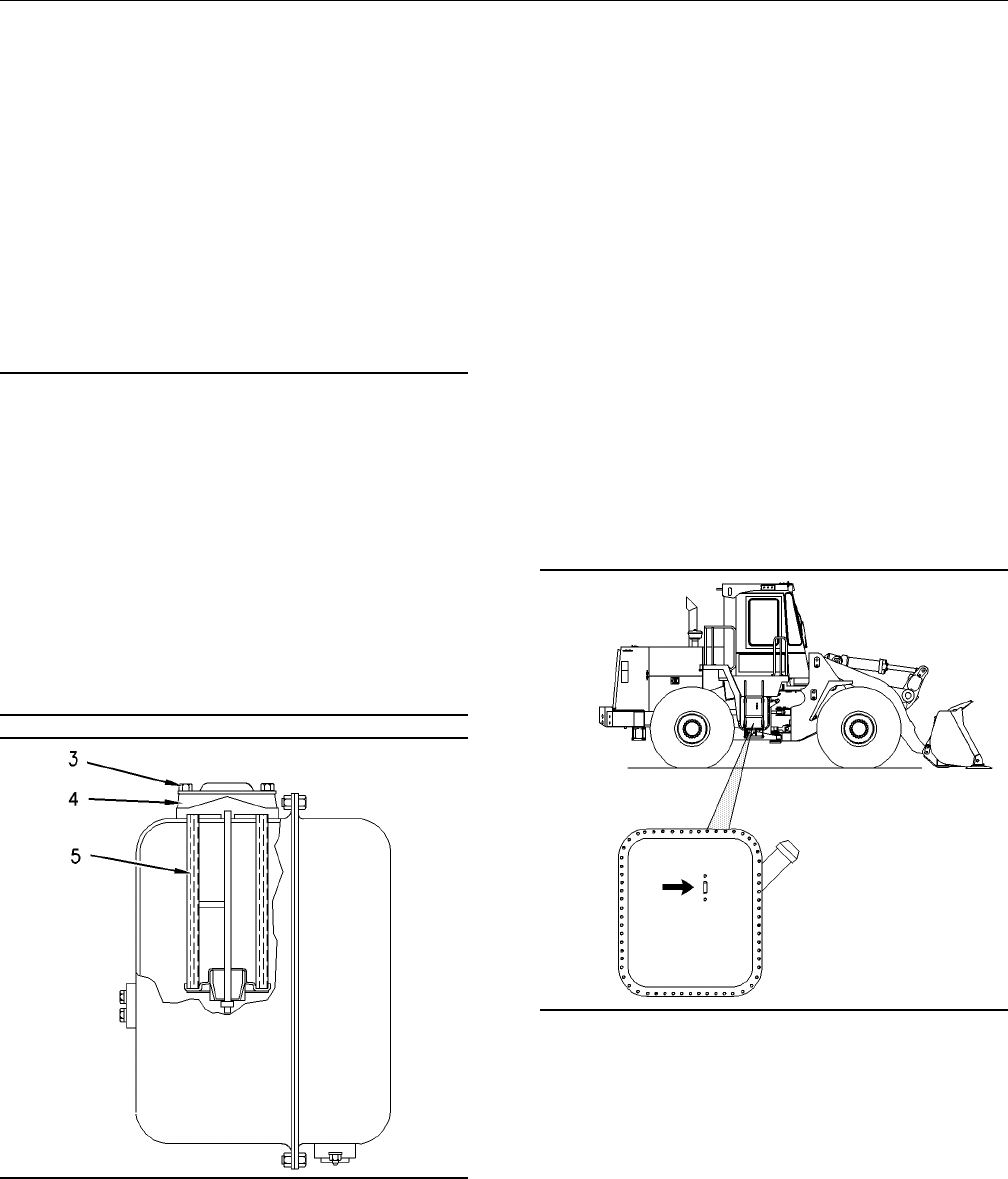
g00813398
Illustration 205
The hydraulic oil filters are located in the hydraulic
oil tank. The hydraulic oil tank is located behind the
platform on the right side of the machine.
1. Remove the three bolts (2) and swing the
platform (1) away from the machine.
2. Remove the four bolts (3) from each of the
covers (4). Remove both of the covers.
3. Remove the filter elements. Discard the old
elements.
4. Clean the covers. Inspect the condition of the
seals. Replace the seals, if necessary.
5. Install new filter elements and install the covers.
Tighten the bolts to 58 ± 4 N·m (42.8 ± 2.9 lb ft).
6. Check the level of the hydraulic oil tank. Add oil,
if necessary.
7. Close the platform and install the three bolts.
i01561998
Hydraulic System Oil Level -
Check
SMCS Code: 5056-535-FLV
g00811304
Illustration 206
The hydraulic tank is located on the right side of
the machine.
Maintain the oil level above the “ADD COLD” mark
on sight gauge (2). If necessary, remove filler cap
(1) slowly and add oil.
Contents Summary of 950F Series II Wheel Loader Operation and Maintenance Manual
- Page 1MAINTENANCE INTERVALS Operation and Maintenance Manual Excerpt ® ® © 2010 Caterpillar All Rights Reserved
- Page 2SEBU6492-04 May 2002 Operation and Maintenance Manual 950F Series II Wheel Loader 4DJ1-Up (Machine) 5SK1-Up (Machine) 8TK1-Up (Machine) 2LM1-Up (Machine)
- Page 390 Maintenance Section Maintenance Interval Schedule i01754730 Belts - Inspect/Adjust/Replace .............................. 94 Brake Accumulator - Check .................................. 95 Maintenance Interval Schedule Brake Oil Reservoir - Clean/Refill ......................... 96 Braking System
- Page 491 Maintenance Section Air Conditioner - Test i01514850 i01558281 Air Conditioner - Test Articulation Bearings - SMCS Code: 7320-081 Lubricate SMCS Code: 7057-086-BD; 7065-086-BD; 7066-086-BD Inhaling air conditioner refrigerant gas through a lit cigarette or other smoking method or inhaling fumes r
- Page 592 Maintenance Section Backup Alarm - Test Note: The oscillation bearings are lubricated by using two remote grease fittings. These fittings are located behind the small access door on the left side of the machine. 1. Wipe all fittings before any lubricant is applied. 2. Fitting (1) lubricates the f
- Page 693 Maintenance Section Battery - Recycle One battery is located on each side of the machine Inspect the electrolyte level in each battery cell. under the access door. Clean the battery terminals (A maintenance free battery does not require and the surfaces of the batteries with a clean cloth. inspec
- Page 794 Maintenance Section Belts - Inspect/Adjust/Replace 3. Disconnect the negative battery cable from the 1. Access the alternator from the left side of the disconnect switch. machine. Note: Do not allow the disconnected battery cable 2. Inspect the condition of the alternator belt. If the to contact
- Page 895 Maintenance Section Brake Accumulator - Check The tension of a used belt with more than 30 Adjusting the Tension of the Water Pump minutes of operation at rated speed should be Drive Belt 400 ± 44 N (90 ± 10 lb). The tension of a new belt with 30 minutes of operation or less at rated speed should
- Page 996 Maintenance Section Brake Air Tank Moisture and Sediment - Drain 2. Start the engine. Run the engine at half speed for i01557322 two minutes in order to increase the accumulator pressure. The alert indicator for brake oil Brake Oil Reservoir - pressure should go off. Clean/Refill 3. Stop the engi
- Page 1097 Maintenance Section Bucket Cutting Edges - Inspect/Replace The following tests are used to determine whether 1. Start the engine. Raise the implement slightly. the braking system is functional. These tests are Engage the parking brake. not intended to measure the maximum brake holding effort. The
- Page 1198 Maintenance Section Bucket Pivot Bearings - Lubricate 1. Raise the bucket and place blocking under the i01098716 bucket. Bucket Tips - Inspect/Replace 2. Lower the bucket onto the blocking. Stop the engine. SMCS Code: 6805-040; 6805-510 3. Remove bolts (1), cutting edge (2) and the end bits. Pers
- Page 1299 Maintenance Section Bucket Wear Plates - Inspect/Replace i01709216 i01521741 Bucket Wear Plates - Cab Air Filter - Clean/Replace Inspect/Replace SMCS Code: 7342-070; 7342-510 SMCS Code: 6120-040; 6120-510 Personal injury or death can result from the bucket falling. Block the bucket before changin
- Page 13100 Maintenance Section Circuit Breakers - Reset i01558427 Main Circuit (4) – 80 amp Circuit Breakers - Reset SMCS Code: 1420-529 Circuit Breaker Reset – Push the button i01558459 in order to reset the circuit breakers. The button will stay depressed if the circuit is Cooling System Coolant working
- Page 14101 Maintenance Section Cooling System Coolant (ELC) - Change Reference: Refer to Operation and Maintenance Manual, “Cooling System Water Temperature NOTICE Regulator - Replace” for the correct procedure. Care must be taken to ensure that fluids are contained during performance of inspection, mainte
- Page 15102 Maintenance Section Cooling System Coolant Additive (DEAC) - Add 1. Slowly loosen the cooling system pressure cap in order to relieve system pressure. NOTICE Care must be taken to ensure that fluids are contained 2. Open the drain valve on the bottom of the during performance of inspection, main
- Page 16103 Maintenance Section Cooling System Level - Check The cooling system pressure cap is located under NOTICE the engine hood at the rear of the machine. Care must be taken to ensure that fluids are contained during performance of inspection, maintenance, test- 1. Slowly loosen the cooling system pre
- Page 17104 Maintenance Section Cooling System Water Temperature Regulator - Replace i01562542 Replace the water temperature regulator and the seals while the cooling system is completely drained Cooling System Water or while the coolant is drained to a level that is Temperature Regulator - below the water
- Page 18105 Maintenance Section Differential and Final Drive Oil Level - Check i01102280 Differential and Final Drive Oil Level - Check SMCS Code: 3278-535-FLV; 4011-535-FLV Note: Before you measure the oil level, operate the machine for a few minutes in order to equalize the oil level. 1. Park the machine
- Page 19106 Maintenance Section Drive Shaft Spline (Center) - Lubricate 2. Remove dipstick/fill plug (1) on the left side of i01562133 the axle. Wipe off the level gauge with a clean cloth and reinsert the plug. This will ensure a Drive Shaft Support Bearing - more accurate measurement of the oil level. Lub
- Page 20107 Maintenance Section Engine Air Filter Primary Element - Clean/Replace i01562179 4. Clean the inside of the air filter housing. Engine Air Filter Primary 5. Inspect the primary element. If the pleats, the Element - Clean/Replace gaskets, or the seals are damaged, discard the element and replace t
- Page 21108 Maintenance Section Engine Air Filter Secondary Element - Replace The primary element can be washed in warm water with a nonsudsing household detergent. Fully rinse the pleats. Allow the primary element to air dry completely. g00811400 Illustration 166 1. Open the engine access door. The air fil
- Page 22109 Maintenance Section Engine Air Filter Service Indicator - Inspect 3. Remove the primary element (2) from the air filter housing. Note: Refer to Operation and Maintenance Manual, “Engine Air Filter Primary Element - Clean/Replace ” for the procedure to remove the primary filter element. g00809894
- Page 23110 Maintenance Section Engine Air Filter Service Indicator - Inspect/Replace Open the access door on the right side of the i01562193 machine in order to access the service indicator. Engine Air Precleaner - Clean Service the air cleaner when the yellow piston in the service indicator is in the red
- Page 24111 Maintenance Section Engine Governor Oil Supply Screen - Clean/Inspect/Replace i01562332 Engine Governor Oil Supply Screen - Clean/Inspect/Replace SMCS Code: 1264-510-Z3; 1264-571-Z3 NOTICE Care must be taken to ensure that fluids are contained during performance of inspection, maintenance, test-
- Page 25112 Maintenance Section Engine Oil Level - Check 9. Close the engine access door. i01562646 Engine Oil Level - Check SMCS Code: 1000-535-FLV NOTICE Do not under fill or overfill engine crankcase with oil. Either condition can cause engine damage. NOTICE Care must be taken to ensure that fluids are c
- Page 26113 Maintenance Section Engine Oil and Filter - Change 3. While the engine is stopped, check the “ENGINE i01562849 STOPPED” side of engine oil dipstick (1). Maintain the oil level between the marks on the Engine Oil and Filter - Change dipstick. SMCS Code: 1318-510 While the engine is running, check
- Page 27114 Maintenance Section Engine Valve Lash - Check g00101318 g00811749 Illustration 181 Illustration 183 4. Apply a thin film of clean engine oil to the sealing 10. Check the engine oil level in dipstick (4). surface of the new filter element. Reference: Refer to Operation and Maintenance 5. Install
- Page 28115 Maintenance Section Ether Starting Aid Cylinder - Replace i01558514 A qualified mechanic should adjust the fuel injector timing because special tools and training are Ether Starting Aid Cylinder - required. Replace i01380757 SMCS Code: 1456-510-CD Fuel System - Prime SMCS Code: 1250-548 g0072914
- Page 29116 Maintenance Section Fuel System Primary Filter (Water Separator) - Drain 4. Start the engine. Look for leaks around the fuel filter assembly. If the engine does not start, or if the engine misfires, more priming is necessary. i01556371 Fuel System Primary Filter (Water Separator) - Drain SMCS Co
- Page 30117 Maintenance Section Fuel System Primary Filter (Water Separator) Element - Replace i01556387 Fuel System Primary Filter (Water Separator) Element - Replace SMCS Code: 1260-510; 1263-510-FQ S/N: 5SK1990-Up S/N: 8TK3231-Up NOTICE Care must be taken to ensure that fluids are contained g00284523 dur
- Page 31118 Maintenance Section Fuel System Primary Filter - Clean/Replace 11. Prime the fuel system in order to fill the water separator element with fuel. Reference: Refer to Operation and Maintenance Manual, “Fuel System - Prime” for the correct procedure. 12. Close the engine access door. i01380766 Fuel
- Page 32119 Maintenance Section Fuel System Secondary Filter - Replace i01380733 There are rotation index marks on the filter at 90 degree intervals. Use these marks as a guide for Fuel System Secondary Filter - proper tightening. Replace NOTICE SMCS Code: 1261-510-SE Do not fill fuel filters with fuel befo
- Page 33120 Maintenance Section Fuel System Secondary Filter Number One - Replace Note: Lower filter (1) has not been drained. The filter NOTICE contains fuel. When you remove the lower filter, use Do not fill fuel filters with fuel before installing them. caution in order to avoid spilling the fuel. Contam
- Page 34121 Maintenance Section Fuel System Secondary Filter Number Two - Replace i01559538 Fuel System Secondary Filter Number Two - Replace SMCS Code: 1261-510-SE S/N: 5SK743-Up Personal injury or death can result from a fire. Fuel leaked or spilled onto hot surfaces or electri- cal components can cause a
- Page 35122 Maintenance Section Fuel Tank Cap and Strainer - Clean 5. Apply a thin coat of clean diesel fuel to the 6. Install a new cap filter kit. Install the other sealing surface of the new fuel filter element. components in reverse order. 6. Install the new fuel filter element by hand. When 7. Install
- Page 36123 Maintenance Section Fuses - Replace Front Floodlights (9) – 10 amp Rear Floodlights (10) – 10 amp Lighter (11) – 10 amp Autoshift (12) – 10 amp Implement Kickout (13) – 10 amp g00809454 Illustration 202 Diverter Valve (14) – 10 amp The fuse panel is located at the right of the operator compartme
- Page 37124 Maintenance Section Hydraulic System Oil - Change i01561960 5. Inspect the gasket on the hydraulic tank filler cap for damage. Replace the gasket, if necessary. Hydraulic System Oil - Change 6. Remove the drain plug (5) from the bottom of the SMCS Code: 5056-044 hydraulic tank. Wash the drain pl
- Page 38125 Maintenance Section Hydraulic System Oil Filter - Replace Note: The oil must be free of air bubbles. If air 2. Remove the four bolts (3) from each of the bubbles are present in the hydraulic oil, air is covers (4). Remove both of the covers. entering the hydraulic system. Inspect the hydraulic s
- Page 39126 Maintenance Section Hydraulic Tank Breaker Relief Valve - Clean i01562008 i01556950 Hydraulic Tank Breaker Relief Lift Arm and Cylinder Linkage Valve - Clean - Lubricate SMCS Code: 5118-070 SMCS Code: 5102-086-BD; 6107-086-BD g00809393 Illustration 208 Lubricate two fittings on each lift arm. Lu
- Page 40127 Maintenance Section Oil Filter - Inspect i01719384 i01562425 Oil Filter - Inspect Radiator Core - Clean SMCS Code: 1308-507; 3004-507; 3067-507; SMCS Code: 1353-070-KO 5068-507 Open the rear grill in order to access the radiator. Inspect a Used Filter for Debris g00100062 Illustration 211 g00100
- Page 41128 Maintenance Section Roading Fender Hinges - Lubricate i01457015 i01555496 Roading Fender Hinges - Rollover Protective Structure Lubricate (ROPS) - Inspect SMCS Code: 7252-086-HNG SMCS Code: 7323-040; 7325-040 Wipe off the fitting before any lubricant is applied. g00813410 Illustration 213 g00761
- Page 42129 Maintenance Section Seat Belt - Replace i01625445 i01555371 Seat Belt - Replace Steering Cylinder Bearings - SMCS Code: 7327-510 Lubricate SMCS Code: 4303-086-BD g00841400 Illustration 214 Regardless of the appearance of the seat belt, the seat belt should be replaced at every three year interva
- Page 43130 Maintenance Section Tire Inflation - Check Measure the tire pressure on each tire. Consult your Caterpillar dealer for the correct load rating and for the correct operating pressures. Inflate tires, if necessary. See Operation and Maintenance Manual, “Tire Inflation Information”. i01556862 Trans
- Page 44131 Maintenance Section Transmission Oil - Change g00809376 Illustration 221 12. The filler tube for the transmission is located near the center hitch. Remove the filler cap (8) and fill the transmission with oil. g00766094 Reference: Refer to Operation and Maintenance Illustration 220 Manual, “Lubr
- Page 45132 Maintenance Section Transmission Oil Filter - Replace i01562428 Transmission Oil Filter - Replace SMCS Code: 3067-510 NOTICE Care must be taken to ensure that fluids are contained during performance of inspection, maintenance, test- ing, adjusting and repair of the product. Be prepared to collec
- Page 46133 Maintenance Section Walk-Around Inspection • Inspect the engine for any obvious component damage. • Inspect the precleaner bowl for dirt buildup. Clean the precleaner bowl if dirt has accumulated to the “FULL” mark. For more information, refer to Operation and Maintenance Manual, “Engine Air Pre
- Page 47134 Maintenance Section Window Washer Reservoir - Fill • Inspect the windows. Make sure that the i01562053 operator’s vision is not impaired by dust, by mud, or by other foreign materials. Clean the Window Wiper - windows, if necessary. For more information, refer to Operation and Maintenance Manual